Iron Key 1.3
Updated on 17 Feb 2012
By Anthony Buckner
By Anthony Buckner
Specifications
License:
Freeware
Updated:
Downloads:
1520
Platform:
Windows All
Publisher:
Inv Softworks(more)
Website:
User Reviews:
Other versions:
1.3, 1.2
Do you like
Iron Key?
Iron Key?
FindMySoft Editor's Review
Iron Key – Lightweight, Free Version of Silver Key
There are some things you are going to like about the Inv Softworks-developed application Iron Key and some things that you are not going to like. Going at it in a logical progression, the first thing you are going to like is that getting Iron Key off the web and onto your computer will only take a moment. The download weighs in at 1.0MB; a 1MB download will complete in no time at all, even on a less than spectacular internet connection.
You are also going to like that installing Iron Key is a simple, straightforward process that goes along smoothly and rapidly. Installing the application on a Windows-powered machine will take about as little time as downloading 1MB off the web.
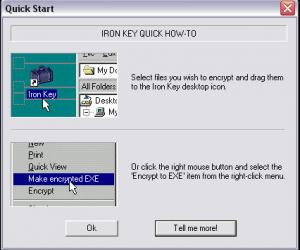
Once Iron Key is up and running, you are going to like that you can use the application free of charge for as long as you want. You can use Iron Key to create self-extracting encrypted files. You can do so by:
- dragging and dropping a file you want to encrypt onto the Iron Key desktop shortcut.
- selecting the file you want to encrypt -> right click it -> select “Encrypt to exe” from the right click context menu.
What you are not going to like is that Iron Key is the lightweight version of Silver Key, an application that we’ve recently covered here on FindMySoft. Iron Key uses a less powerful encryption algorithm, cannot encrypt folders or multiple files at a time, does not provide support for binary key files (Silver Key will locate and use a binary key stored on an USB stick key automatically), and does not support data compression. There’s one other thing you may not like about Iron Key – the developer does not provide support for Iron Key.
If you want a free, lightweight encryption tool, Iron Key is worth a try.
Pros
Cons
About Inv Softworks
Established back in 1999, Inv Softworks specializes in the development of top quality file encryption software for corporate and home users. The company offers reliable and time-proven applications that are easy to use, stable and secure. Inv Softworks also offers excellent technical support.
Additional details on Inv Softworks and its products are available here.
You are also going to like that installing Iron Key is a simple, straightforward process that goes along smoothly and rapidly. Installing the application on a Windows-powered machine will take about as little time as downloading 1MB off the web.
Once Iron Key is up and running, you are going to like that you can use the application free of charge for as long as you want. You can use Iron Key to create self-extracting encrypted files. You can do so by:
- dragging and dropping a file you want to encrypt onto the Iron Key desktop shortcut.
- selecting the file you want to encrypt -> right click it -> select “Encrypt to exe” from the right click context menu.
What you are not going to like is that Iron Key is the lightweight version of Silver Key, an application that we’ve recently covered here on FindMySoft. Iron Key uses a less powerful encryption algorithm, cannot encrypt folders or multiple files at a time, does not provide support for binary key files (Silver Key will locate and use a binary key stored on an USB stick key automatically), and does not support data compression. There’s one other thing you may not like about Iron Key – the developer does not provide support for Iron Key.
If you want a free, lightweight encryption tool, Iron Key is worth a try.
Pros
- Lightweight download
- Easy to use
- Integrates with Windows Explorer
- Freeware
Cons
- Not as many features as Silver Key
About Inv Softworks
Established back in 1999, Inv Softworks specializes in the development of top quality file encryption software for corporate and home users. The company offers reliable and time-proven applications that are easy to use, stable and secure. Inv Softworks also offers excellent technical support.
Additional details on Inv Softworks and its products are available here.
Do you like Iron Key
Advertising
Popular News
Microsoft recently announced that the parental controls for the upcoming Windows 8 operating system will be even better than what Windows 7 has to offer.
A look at the system requirements needed to run the most popular browsers out there today.
Iron Key Awards
Iron Key Editor's Review Rating
Iron Key has been reviewed by George Norman on
16 Nov 2010. Based on the user interface, features and complexity, Findmysoft has rated
Iron Key
3
out of 5 stars, naming it Very GoodYour Rating
Top Downloads
2.
Opera5.
Trillian8.
AIM9.
Skype10.
Ad-Aware12.
Nero13.
Google Earth14.
Picasa15.
Winamp16.
iTunes17.
RealPlayer18.
uTorrent19.
eMule20.
WinRAR21.
BitComet22.
WinZip23.
Shareaza24.
CCleaner25.
Recuva26.
Tweak UI27.
CuteFTP Home29.
Adobe Reader30.
NewsPiperBecome A Fan!
Link To Us!
Iron Key
HTML Linking Code
HTML Linking Code
Latest Reviews



